
Medication reminders you confirm with a tap
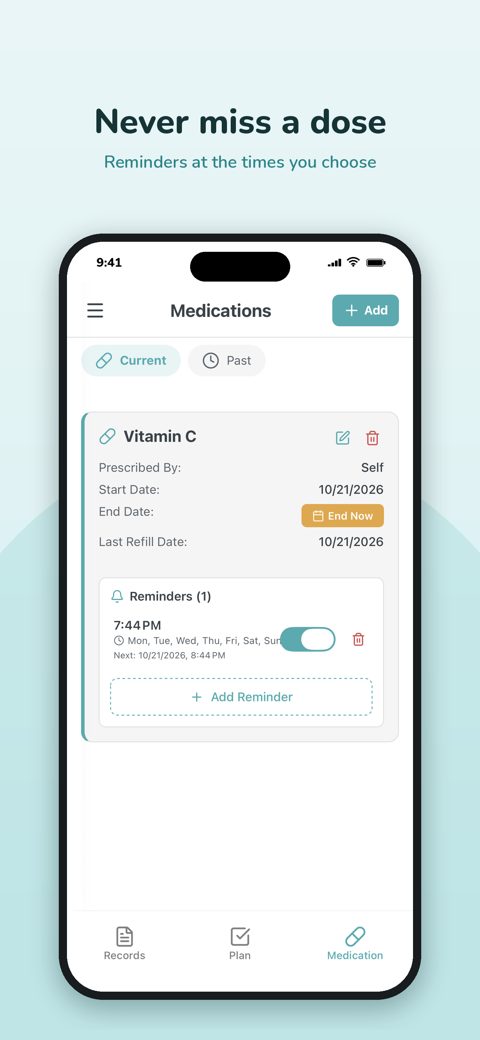
Add each medication once, with its dose and schedule. Saluso reminds you at the right time, wherever you are, and you answer with one tap: taken or skipped.
Reminders where you will see them
Not everyone looks at app notifications. Choose how each reminder reaches you, on the schedule you set for that medication.
- SMS, WhatsApp, email or an in-app notification
- A schedule for each medication: times and days of the week
- Confirm "Yes, I took it" or mark the dose as skipped
Your medication list in one place
Current and past medications sit next to your lab results and health records, so the answer is there when a doctor asks what you are taking.
- Current and previous medications, with start and end dates
- The same list on the web, iPhone and Android
- Share it with your doctor or a family member when you choose
For you, or for someone you look after
With your permission, a family member or carer can see your medication list. It helps when someone else is helping you keep track.
- You decide who can see your medication
- Access can be limited in time and withdrawn at any moment
How it works
- Add the medication and its dose.
- Set the times, the days and how you want to be reminded.
- When the reminder arrives, confirm the dose with a tap.
Questions and answers
- How are medication reminders delivered?
- By SMS, WhatsApp, email or in-app notification, on the schedule you set for each medication.
- Does Saluso tell me which medication to take?
- No. Saluso reminds you of the medication and schedule you entered. It does not prescribe, change doses or replace advice from your doctor or pharmacist.
- Do reminders reach me when the app is closed?
- Yes. SMS, WhatsApp and email reminders arrive even when the app is closed, and your medication list is the same on the web, iPhone and Android.
More from Saluso
- Lab resultsUpload your lab reports as PDF. Saluso reads the values, keeps them in one record and shows how each one changes over time, next to its reference range.
- Sharing with your doctorChoose who sees your health records, which parts and for how long. Give a doctor a temporary access code, see who looked, and revoke access at any time.
- Wearables and appsConnect Apple Health, Google Health Connect, Fitbit, Garmin, Withings, Oura, Polar and more. Steps, sleep, heart rate and weight sit beside your lab results.
- Security and privacyYour health data is encrypted in transit and at rest, never sold and never used for ads. Export or delete it at any time. GDPR compliant.
- PricingSaluso is free for 30 days. After that it costs €8.99 a month or €74.99 a year, VAT included. One account for iPhone, Android and the web. Cancel anytime.
Try Saluso free for 30 days
One account works on iPhone, Android and the web.