
Share your health records with your doctor, on your terms
You decide who sees your health information, which parts, and for how long. Change your mind and the access ends at once.
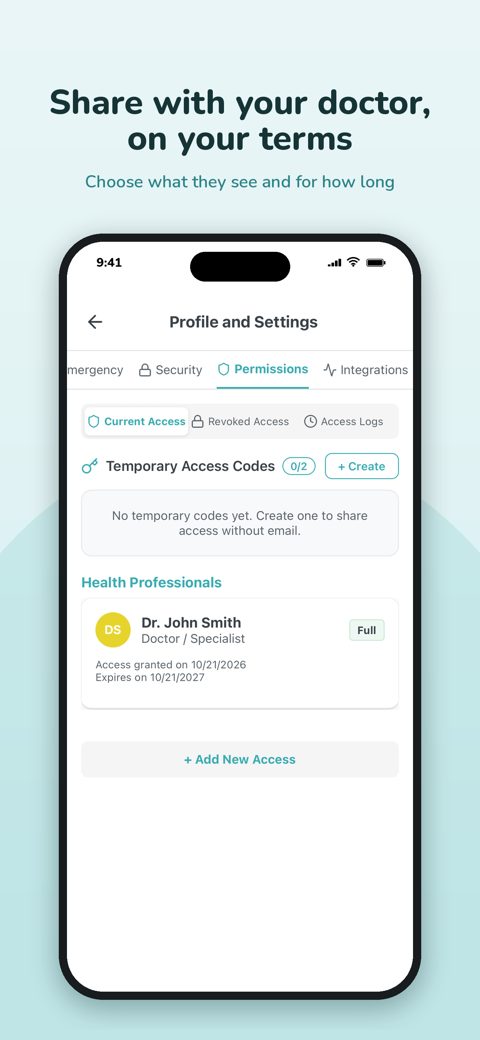
Choose exactly what each person sees
A doctor before an appointment, a family member, a carer: each person gets only the parts of your record you pick.
- Permissions per person and per type of information
- Set how long the access lasts
- Revoke it instantly, whenever you like
A temporary code for a consultation
Seeing a health professional who does not use Saluso? Create a temporary access code. They enter it at saluso.com/code, in a browser, and see what you chose to share.
- No email invitation needed
- You choose how long the code lasts and what it opens
- Codes expire on their own and can be revoked earlier
See who looked
When someone opens your information through shared access or a temporary code, Saluso records it. One log shows who accessed what, and when.
- A clear access log
- Current, revoked and expired access listed separately
How it works
- Open Permissions in your profile.
- Invite a person, or create a temporary access code.
- Choose what they can see and for how long. Revoke it whenever you want.
Questions and answers
- Can I control exactly what I share?
- Yes. You choose what each person or clinician can see, set how long access lasts, see who viewed what, and revoke access instantly.
- Does my doctor need to install Saluso?
- No. With a temporary access code, a health professional opens saluso.com/code in a browser and enters the code.
- What happens when I revoke access?
- The person or the code stops working straight away and can no longer open your information.
More from Saluso
- Lab resultsUpload your lab reports as PDF. Saluso reads the values, keeps them in one record and shows how each one changes over time, next to its reference range.
- Medication remindersAdd each medication once. Saluso reminds you at the right time by SMS, WhatsApp, email or in the app, and you confirm each dose with a tap.
- Wearables and appsConnect Apple Health, Google Health Connect, Fitbit, Garmin, Withings, Oura, Polar and more. Steps, sleep, heart rate and weight sit beside your lab results.
- Security and privacyYour health data is encrypted in transit and at rest, never sold and never used for ads. Export or delete it at any time. GDPR compliant.
- PricingSaluso is free for 30 days. After that it costs €8.99 a month or €74.99 a year, VAT included. One account for iPhone, Android and the web. Cancel anytime.
Try Saluso free for 30 days
One account works on iPhone, Android and the web.